

Most GA4 users have seen the Analytics Advisor panel. It surfaces a headline number or a short observation, usually in under a minute. We wanted to know what happens when you ask it the questions a growth analyst actually asks every day: not just what happened, but why, and what to fix.
We ran the same four questions through GA4's Analytics Advisor and through ClickBoss, on the same connected account, on the same day. The pattern that emerged was consistent. GA4 described the data. ClickBoss checked whether the data could be trusted, then explained what it meant for the business.
Test 1: total revenue and pacing
What was my revenue in the last 7 days?
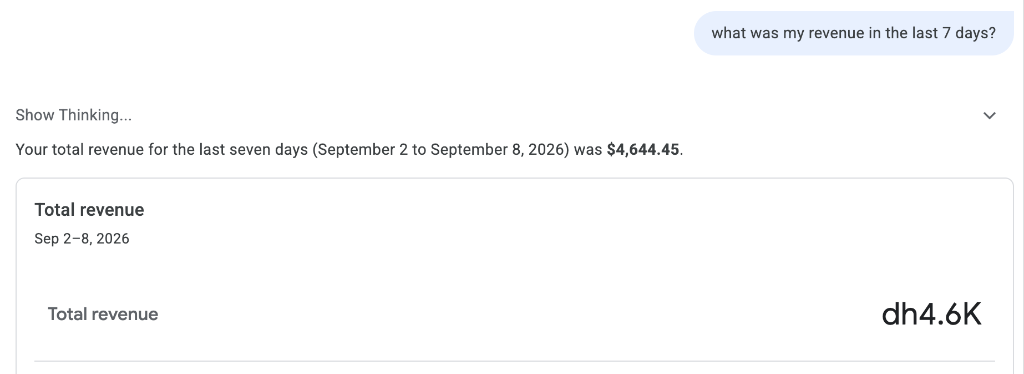
GA4 Advisor responded in 12s:
Your total revenue for the last seven days (September 2 to September 8, 2026) was $4,644.45.
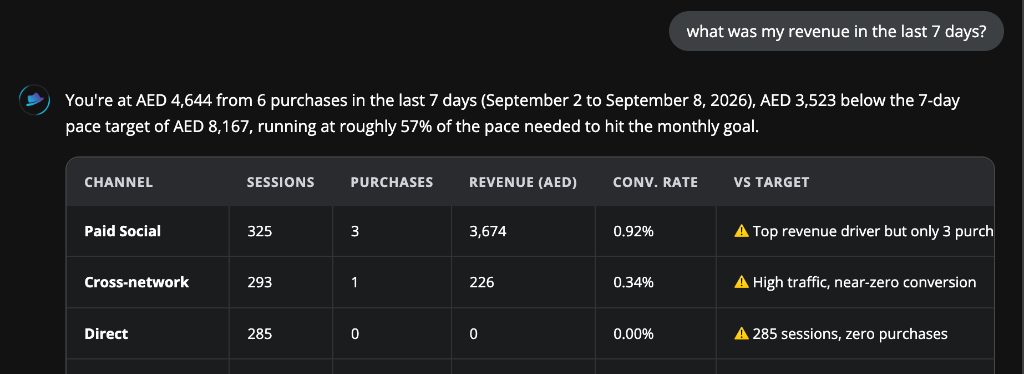
ClickBoss responded in 45s:
You're at AED 4,644 from 6 purchases in the last 7 days (September 2 to September 8, 2026), AED 3,523 below the 7-day pace target of AED 8,167, running at roughly 57% of the pace needed to hit the monthly goal.
Verdict: GA4 reported the total. ClickBoss reported the total, the order count behind it, and whether that number is enough to hit the month's goal. A raw revenue figure with no target attached doesn't tell you if you should be worried. Pacing does.
Test 2: why did conversion rate drop
Why did my conversion rate drop last week?
GA4 Advisor responded in 30s:
The combination of stable traffic, an increase in cart additions, and a sudden drop in checkout and purchase events suggests a technical issue in the checkout.
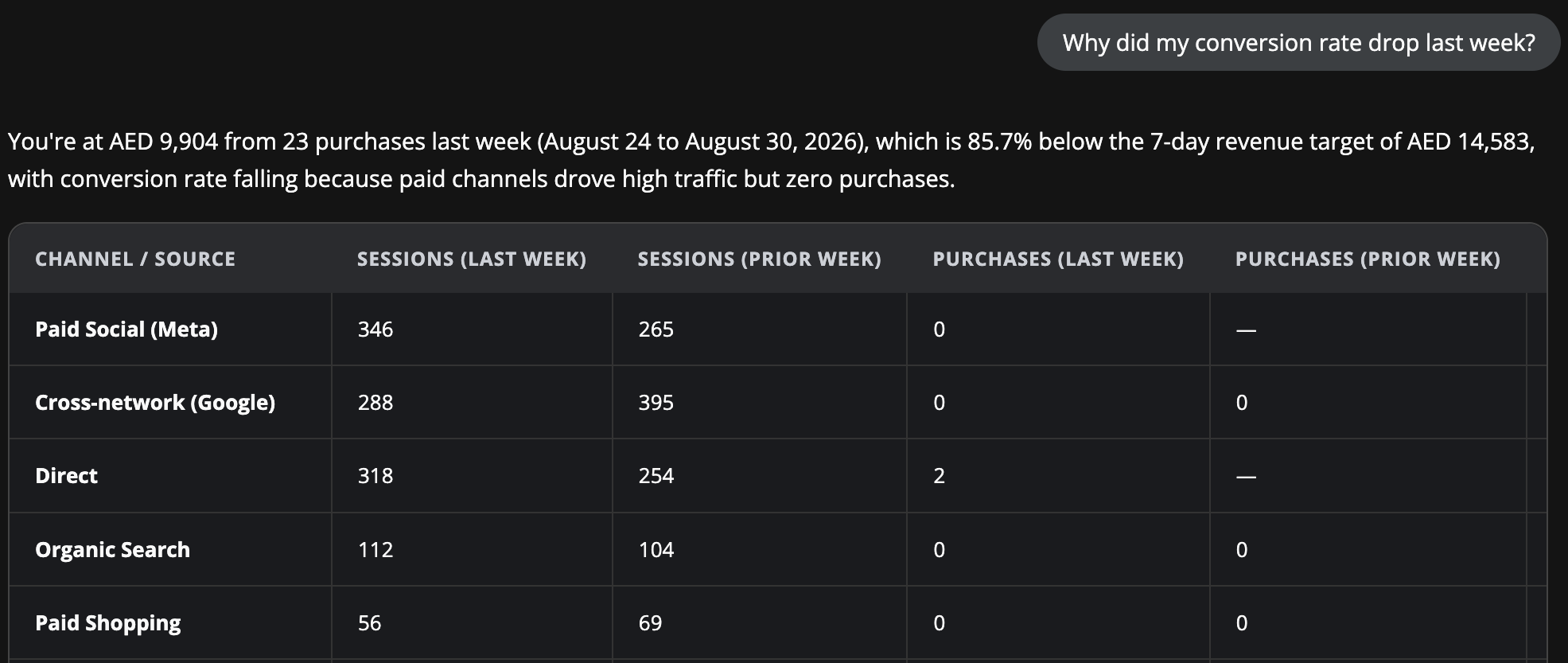
ClickBoss responded in 54s:
Paid channels (AED 560 spend) drove 663 sessions but zero GA4 purchases. The single highest-impact fix: audit the Meta pixel and Google Ads conversion tag.
Verdict: GA4 pattern-matched a plausible story from the funnel shape and pointed at the checkout. ClickBoss traced the drop to specific paid channels sending traffic with zero recorded purchases, then named the two tags most likely to be broken. One is a guess. The other is a fix you can hand to a developer this afternoon.
Test 3: the bounce rate spike that wasn't real
Why is my bounce rate up on my top landing pages?
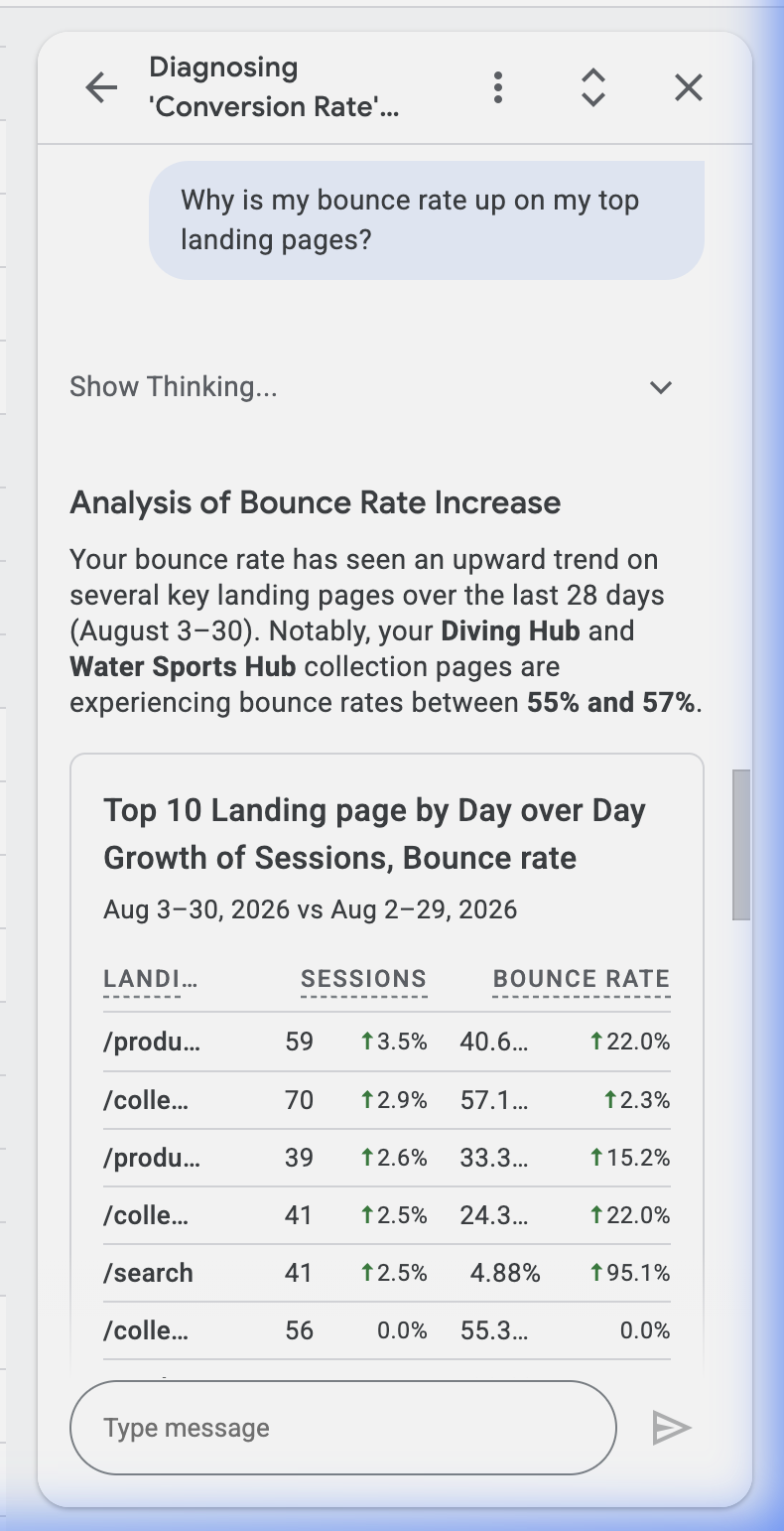
GA4 Advisor responded in 40s:
Your bounce rate has seen an upward trend on several key landing pages. Diving Hub and Water Sports Hub are experiencing bounce rates between 55% and 57%.
ClickBoss responded in 53s:
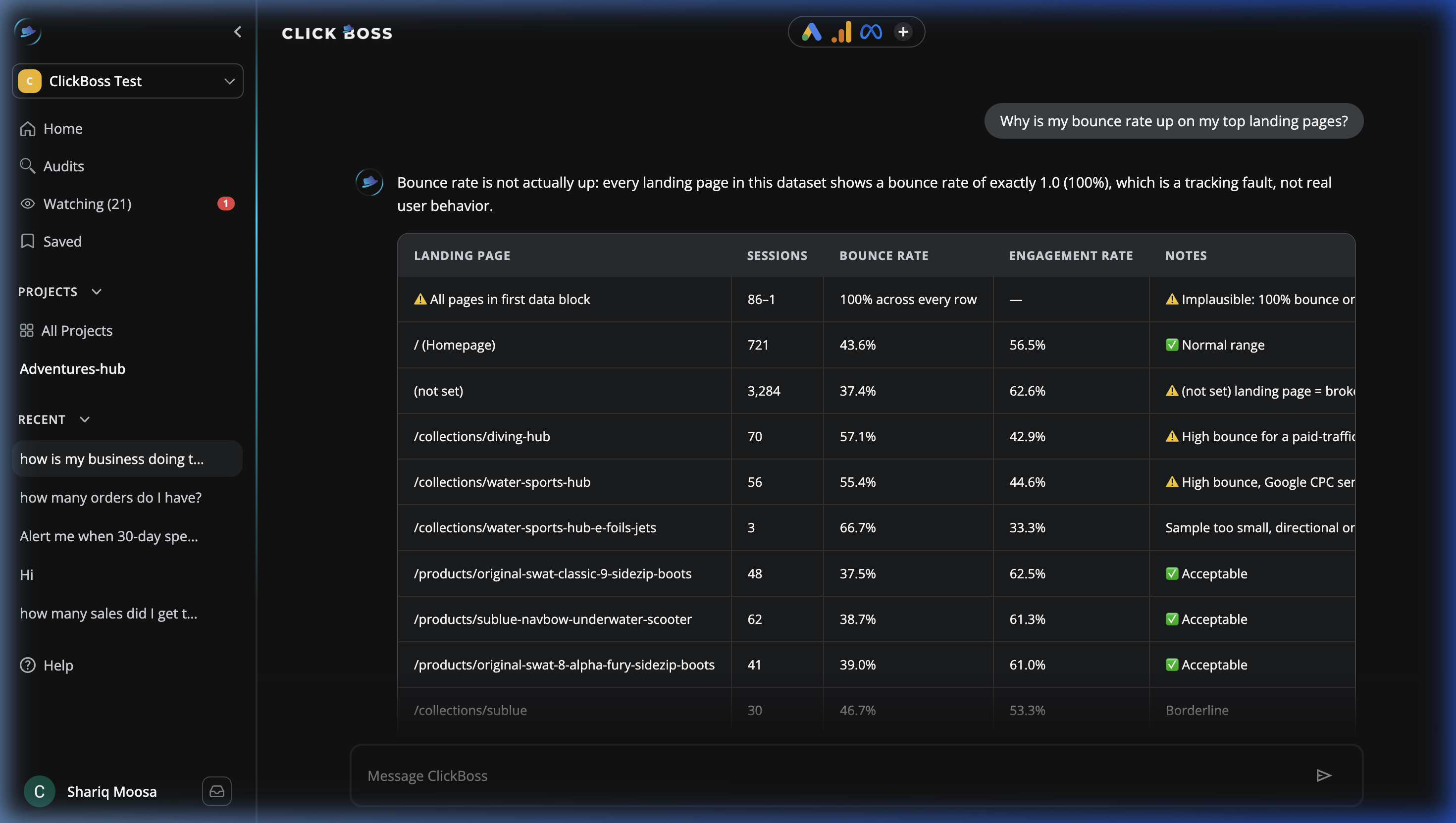
Bounce rate is not actually up. Every landing page in this dataset shows a bounce rate of exactly 1.0 (100%), which is a tracking fault, not real user behavior.
Verdict: GA4 treated the numbers as real and reported the trend on top of them. ClickBoss checked whether the numbers were plausible first, found that every single page showed exactly 100% bounce rate, a value real user behavior essentially never produces, and flagged the tracking break before drawing any conclusion about visitor behavior. Acting on a bounce rate "spike" that's actually a broken tag means redesigning pages that were never the problem.
Test 4: the conversion setup audit
Are my conversion events set up correctly?
GA4 Advisor responded in ~2m:
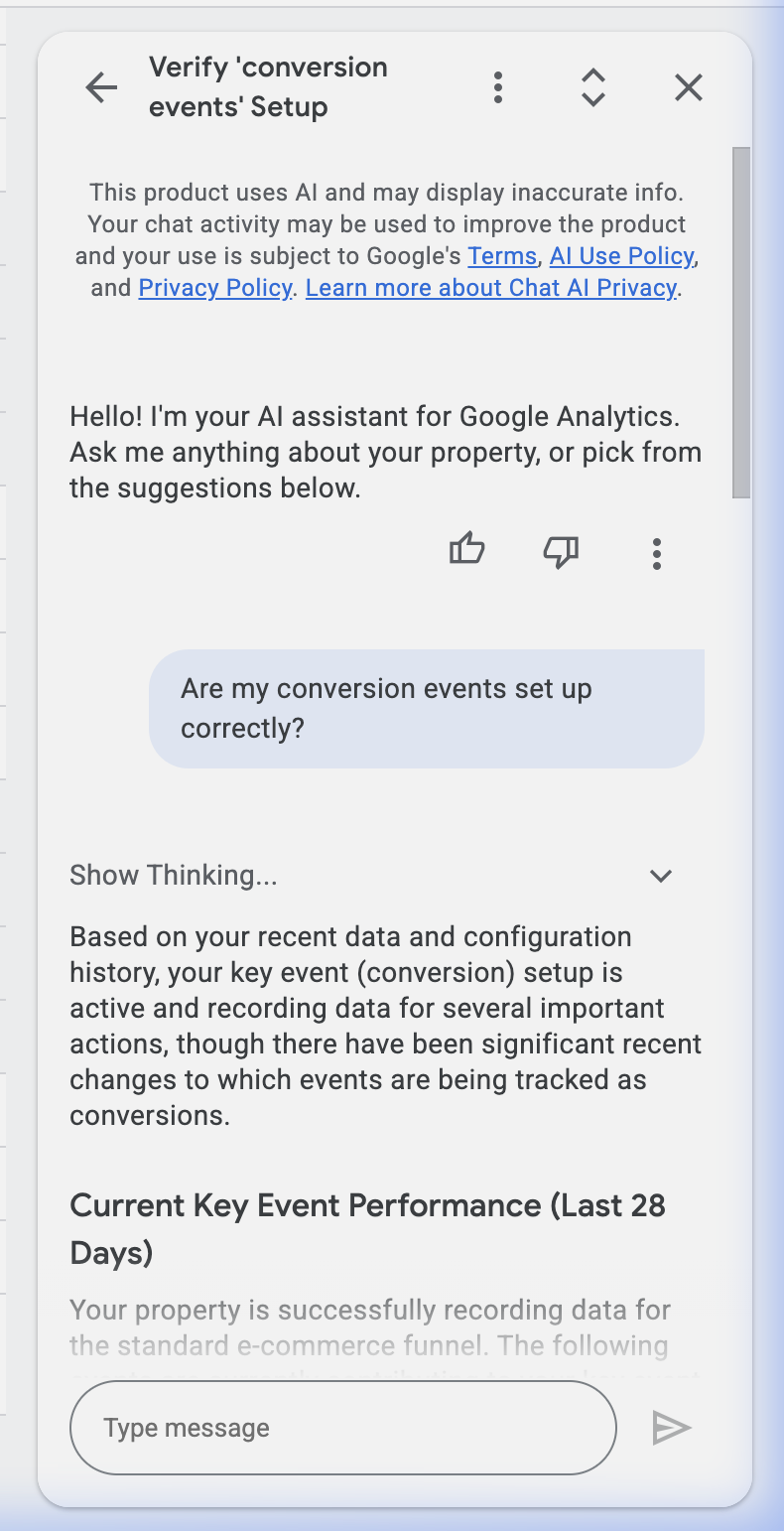
Your key event setup is active and recording data. Observations: add_shipping_info is being recorded but not marked as a key event.
ClickBoss responded in 54s:
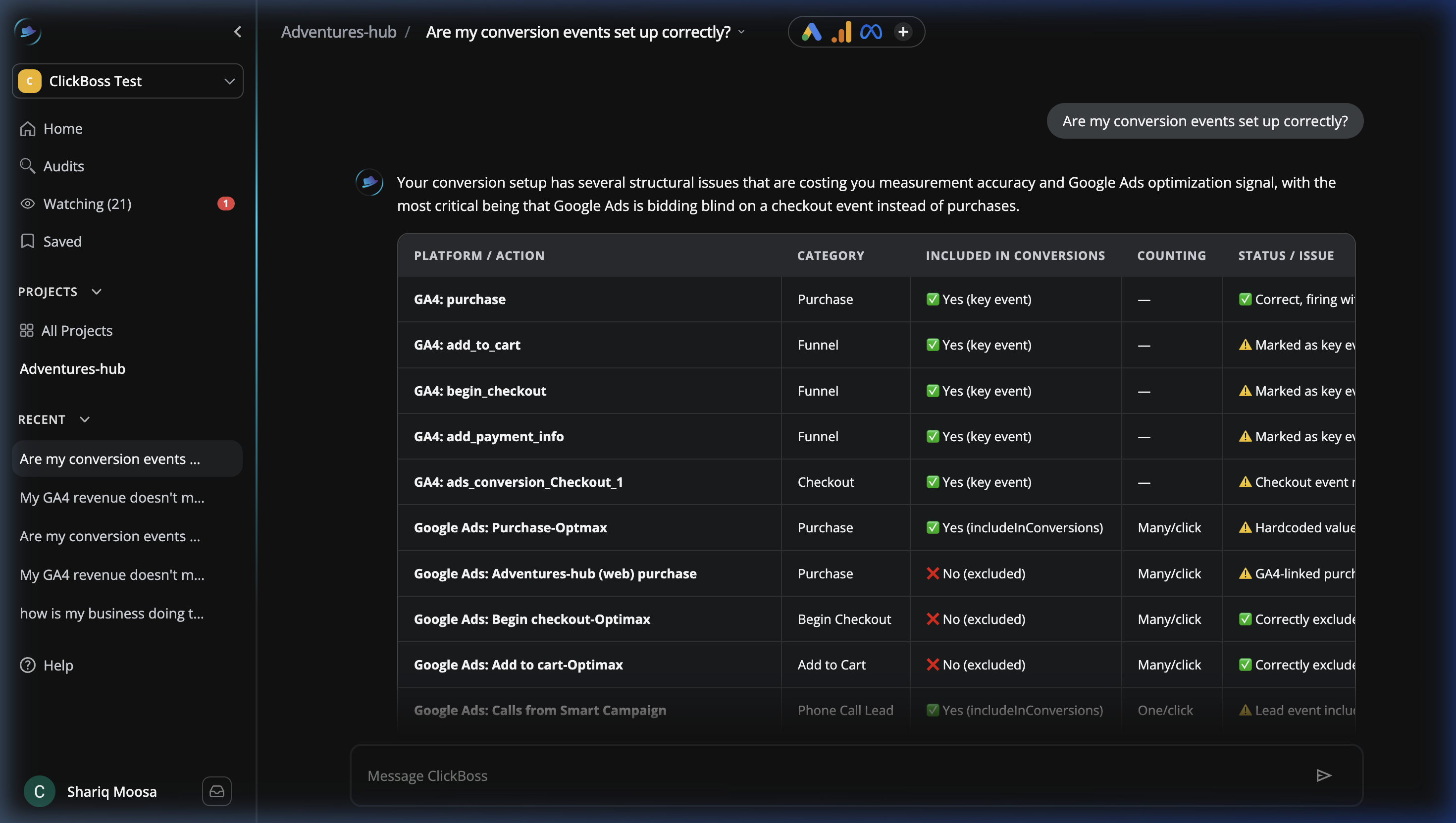
Google Ads is bidding blind on a checkout event instead of purchases. Google Ads is optimizing to a purchase action with a hardcoded AED 1.0 value. GA4 has 4 non-purchase events marked as key events.
Verdict: This is a financial risk, not a checklist item. A hardcoded AED 1.0 purchase value means Google's bidding algorithm has no real signal for which conversions are actually worth more, so it can't optimize spend toward the customers who matter. Four non-purchase events marked as key events means every conversion count GA4 reports is inflated, which then feeds the same bad signal back into Google Ads. GA4 found a missing tag. ClickBoss found the reason the ad account was spending against the wrong target.
The pattern across all four tests
Run all four side by side and the same shape repeats. GA4's Analytics Advisor is fast and accurate about what the data says. It answered in 12 seconds to 2 minutes, always correctly describing the number in front of it. What it doesn't do is question whether that number is trustworthy before reporting it as a trend.
ClickBoss took longer on every test, usually 45 to 55 seconds, because it was doing a different job: checking the data for tracking faults and attribution breaks before drawing a conclusion, then tying the finding back to spend, pacing, or the bidding algorithm. A fast wrong answer is worse than a slower correct one. In the bounce rate test, GA4's fast answer would have sent someone to redesign pages that were never underperforming. ClickBoss's slower answer caught the actual fault in under a minute.
Businesses running paid media at any real scale don't need a faster way to read a number. They need to know when the number itself can't be trusted, and what to fix when it can't.
Frequently asked questions
Is GA4's Analytics Advisor bad? No. It's fast and accurate for straightforward reporting questions. It wasn't built to question the data before reporting it, so tracking faults and attribution breaks get reported as if they were real trends.
What does ClickBoss check that GA4 doesn't? ClickBoss checks whether a metric is structurally plausible, a 100% bounce rate on every page, for example, before treating it as real behavior, and traces drops back to the specific channel, tag, or setup issue causing them.
Why did ClickBoss take longer to answer in these tests? Because it was auditing the data before summarizing it. Every response ran a check for tracking faults, attribution gaps, and conversion setup issues rather than reading the number straight from the report.
Does this mean GA4 data is unreliable? Not inherently. It means GA4 reports what it's given without flagging when the underlying tracking is broken. The tests above found tracking faults in the same accounts GA4 was reporting from cleanly.